

Resident Evil Requiem’s path tracing mode delivers a dramatic visual leap deeper shadows, realistic bounce lighting and reflections that transform every corridor into a tension-filled nightmare. It’s easily one of the most impressive lighting upgrades the franchise has seen.
But that realism comes at a serious performance cost. Even high-end GPUs can struggle without AI assistance.
In this guide, you’ll learn exactly which settings to enable or disable, what frame rates to realistically expect at different resolutions, and which GPUs benefit most from DLSS 4, Ray Reconstruction and Frame Generation — so you can balance horror atmosphere with smooth gameplay.
What path tracing changes in Resident Evil Requiem
Path tracing is basically “full-fat” ray tracing: instead of faking most lighting with baked tricks, it simulates both direct light (from lamps, torches, moonlight) and indirect light (the light that bounces around a room) often across multiple bounces to produce a more physically accurate scene.
That matters in a survival horror game because Requiem lives and dies on what you can’t quite see. With path tracing on, you get:
- More believable darkness (shadowed corners stay oppressive, but not artificially crushed)
- Natural “bounce” lighting in dirty interiors, so rooms feel real rather than flat-lit
- Reflections that actually match the space, which makes movement and threats harder to read in a good way
Path tracing vs ray tracing vs “no RT” (what you actually notice)
No RT:
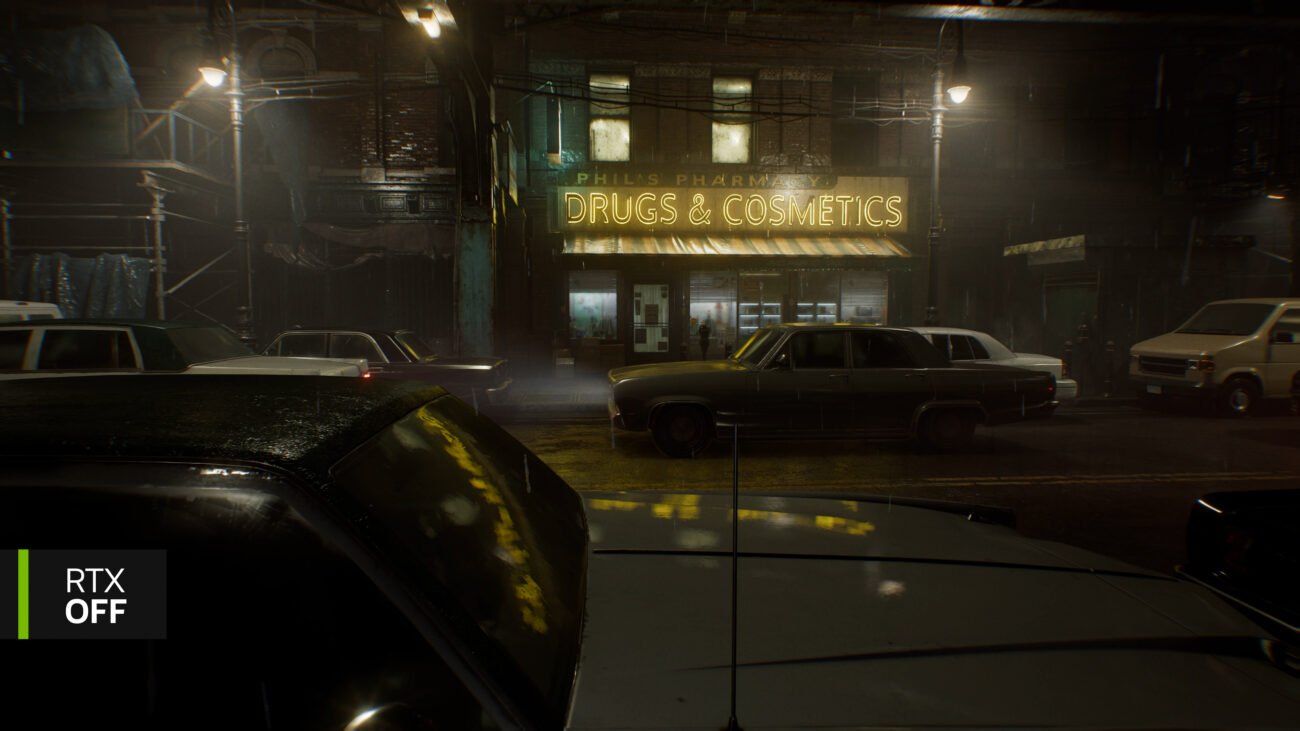
Lighting and reflections rely on traditional methods (baked lighting, screen-space effects). It can still look great, but it’s less responsive to dynamic light and scene changes.
Ray tracing (standard RT):
Usually upgrades specific effects (often reflections and/or shadows) while the rest of the lighting model remains hybrid. In Requiem, that translates to noticeably richer indoor lighting and more convincing reflections — but it’s still a step below full path tracing.
Path tracing:
Upgrades the whole lighting solution at once reflections, refractions, shadows, and global illumination all benefit together. NVIDIA describes it as enabling more complex lighting interactions (including multiple shadows from different light sources and glass interactions), which is why scenes feel more “cinematic-real” rather than “graphics-feature-real.”
Two easy tells when you toggle it:
- Contact-hardening / softening shadows: shadows are sharper close to objects and soften as they spread out — a more physically plausible look (especially around clutter, railings, and doorway light).
- Reflections + indoor lighting depth: reflections look less “screen-y”, and interior spaces gain realistic light spill and bounce — the same areas PC Gamer flags as the most obvious visual upgrade (and the first place you feel the performance hit).
Why performance drops so hard (and why DLSS matters)
Path tracing doesn’t just upgrade a few lighting effects it fundamentally changes how light is calculated in the game. Instead of relying on pre-baked solutions and selective ray-traced effects, the GPU has to simulate multiple light bounces, complex shadow interactions and advanced denoising every single frame.
That’s why it’s incredibly demanding and why DLSS is effectively required if you want playable frame rates with path tracing enabled in Resident Evil Requiem.
Here’s the key thing to understand:
It’s not your CPU struggling it’s the lighting workload overwhelming your GPU. Path tracing massively increases per-frame rendering cost, so performance drops sharply even if the rest of your system is high-end.
Quick reality check from benchmarks
Even at the very top end, the performance hit is dramatic.
Testing shows that an RTX 5090 running at 4K with maximum settings and Path Tracing enabled can drop into the 24–27 FPS range when using DLAA (native-resolution anti-aliasing without upscaling). That’s flagship hardware dipping into sub-30 FPS territory purely because of lighting complexity.
Further testing at the high end shows similarly steep drops when switching from standard ray tracing to full path tracing in some cases cutting frame rates roughly in half.
The takeaway is simple: Path tracing is a visual showcase feature, but without DLSS Super Resolution and Frame Generation, it’s not realistically playable at 4K even on the most powerful GPUs available.
DLSS features in Requiem explained (what each toggle does)
Resident Evil Requiem’s DLSS stack is best thought of as a toolkit: one setting controls how the game is rendered (Super Resolution), one cleans up path-traced noise (Ray Reconstruction), and optional frame generation boosts smoothness. When you combine them correctly, you get the “cinematic lighting” look without turning the game into a slideshow.
DLSS Super Resolution
What it does: Renders the game at a lower internal resolution, then reconstructs detail using AI trading a bit of native sharpness for a big performance gain.
Balanced vs Performance vs Ultra Performance (what changes):
- Balanced: The safest quality/performance middle ground for most players good detail retention with a meaningful FPS uplift.
- Performance: Noticeably higher FPS, but fine detail and distant textures can look softer.
- Ultra Performance: Huge FPS boost, but the softness becomes more obvious, especially in foliage, hair, and small texture detail. Tom’s Guide specifically calls out slight image softness at Ultra Performance in testing.
DLSS Ray Reconstruction (why it’s tied to path tracing)
What it does: Ray Reconstruction replaces traditional denoisers with an AI model that reconstructs ray-traced lighting, reflections, and global illumination more cleanly which is especially important when path tracing is active. NVIDIA positions DLSS Ray Reconstruction as part of the DLSS feature set shipping with Requiem alongside path tracing.
Why it matters for Requiem: Path tracing produces a lot of “noise” that must be denoised every frame. Ray Reconstruction helps stabilise that lighting and reflection detail so the image looks less smeary and more consistent in motion.
Potential issues to watch for: DSOGaming notes that in some scenarios you may still spot ghosting or artefacting with Ray Reconstruction / path tracing combinations (scene-dependent, more noticeable in motion and complex materials).
Frame Generation vs Multi Frame Generation
Both technologies increase displayed frame rates by generating AI-assisted frames between traditionally rendered ones but they’re not the same.
RTX 40 Series – DLSS Frame Generation
DLSS Frame Generation inserts one AI-generated frame between rendered frames, significantly increasing perceived smoothness. It works alongside DLSS Super Resolution and is especially useful when path tracing pushes base FPS into the 30–50 range.
However, remember: Frame Generation multiplies your base frame rate it doesn’t fix a weak one. If you’re starting from very low FPS, responsiveness can still feel limited.
RTX 50 Series – DLSS 4 Multi Frame Generation
DLSS 4 Multi Frame Generation goes further. NVIDIA describes it as generating multiple additional frames per rendered frame, dramatically increasing displayed frame rates compared to traditional rendering alone.
This can result in very high on-screen FPS numbers but the same rule applies: your base rendered frame rate still matters for input responsiveness and overall stability. Ideally, you want a healthy native baseline before leaning heavily on Multi Frame Generation.
NVIDIA Reflex
NVIDIA Reflex is a latency-reduction technology designed to minimise system lag between your input (mouse/keyboard/controller) and what appears on screen.
This matters most when:
- You’re using Frame Generation or Multi Frame Generation
- Your GPU is heavily loaded (which path tracing almost guarantees)
NVIDIA states that Reflex can significantly reduce system latency by optimising the rendering pipeline and GPU queue, helping maintain responsive controls even when advanced features like path tracing and AI frame generation are enabled.
It won’t increase your FPS but it can make high-FPS, AI-assisted gameplay feel much more responsive.
Best settings for Resident Evil Requiem (by GPU tier)
There isn’t one “best” configuration — it depends on whether you prioritise visual fidelity, smoothness, or long-session stability. Use the decision tree below to match your hardware and expectations.
Settings Philosophy (Quick Decision Box)
If you want maximum visual fidelity (cinematic horror mode):
- ✅ Path Tracing: On
- ✅ DLSS Ray Reconstruction: On
- ✅ DLSS Super Resolution: Quality or Balanced
- ✅ Reflex: On
- ⚠️ Frame Generation / Multi Frame Generation: Optional, but only if base FPS is healthy
This is the showcase setup. You’re aiming for lighting realism first, FPS second.
If you want competitive smoothness (high FPS, low latency):
- ✅ Ray Tracing: High (not full Path Tracing)
- ✅ DLSS Super Resolution: Balanced or Performance
- ✅ Frame Generation (RTX 40) or Multi Frame Generation (RTX 50)
- ✅ Reflex: On
You keep improved reflections and shadows, but avoid the extreme performance hit of path tracing.
If you want stability on mid-range GPUs:
- ✅ Ray Tracing: Off or Standard RT
- ✅ DLSS Super Resolution: Balanced or Performance
- ❌ Path Tracing: Off
- ⚠️ Frame Generation: Use only if base FPS is already stable
Resident Evil Requiem still looks strong without full RT/PT thanks to its baked lighting and art direction. You’re trading subtle realism for consistent frame pacing.
RTX 50 Series Recommendations
These GPUs are clearly positioned for full Path Tracing + DLSS 4 Multi Frame Generation.
Recommended approach:
- Start with Path Tracing + DLSS Quality or Balanced
- Check your base FPS (before Multi Frame Generation scaling)
- If base FPS is above ~40, enable Multi Frame Generation
- Always enable Reflex
Key rule: Don’t rely on Multi Frame Generation to “rescue” sub-30 FPS performance. Keep your base frame rate healthy first, then layer AI frames on top.
At 1440p, Path Tracing becomes far more realistic than at native 4K unless you’re comfortable leaning heavily on DLSS modes.
RTX 40 Series Recommendations
These GPUs benefit heavily from DLSS Frame Generation, but Path Tracing remains demanding.
Balanced setup:
- Ray Tracing: High (avoid full PT unless using aggressive DLSS)
- DLSS Super Resolution: Balanced or Performance
- Frame Generation: On
- Reflex: On
Path Tracing can be used at 1440p with DLSS, but expect significant drops compared to standard RT. If smoothness matters more than marginal lighting improvements, stick to High RT instead of full PT.
Mid-Range / Older RTX Advice
If you’re running a lower-tier RTX GPU:
- Disable Path Tracing
- Use standard Ray Tracing (or disable RT entirely)
- Enable DLSS Super Resolution (Balanced or Performance)
- Keep Frame Generation off unless base FPS is solid
The good news: Resident Evil Requiem still looks excellent without Path Tracing. The lighting is strong even in non-RT modes, so you’re not “ruining” the visual experience — you’re just avoiding the most extreme workload tier.
Simple Rule to Remember
- Path Tracing = Showcase mode
- High RT + DLSS = Smart enthusiast mode
- RT Off + DLSS = Stable performance mode
Choose based on your GPU tier and more importantly, based on whether you want cinematic dread or locked-in smoothness.
RTX 50 series recommendations
NVIDIA’s own Requiem showcase makes the target clear for RTX 50 cards: max settings + path tracing, with DLSS Ray Reconstruction improving the path-traced image and DLSS 4 Multi Frame Generation used to “multiply frame rates” for high-resolution play.
How to set it up in practice (and keep it feeling good):
- Start point (the “showcase” preset):
- Path Tracing: On
- DLSS Ray Reconstruction: On (path tracing is designed to pair with it)
- DLSS Super Resolution: Quality / Balanced at 1440p, Balanced / Performance at 4K (then tune from there)
- Best-practice rule before enabling Multi Frame Gen:
Treat Multi Frame Generation as a multiplier, not a miracle. Independent benchmark testing found the experience felt smooth with minimal latency concerns when the base framerate was above ~40 FPS, and explicitly recommends enabling Multi Frame Generation when your base framerate is above 40 FPS. - A quick real-world reference point (why the base-FPS rule matters):
The same testing shows that at 4K max with path tracing and DLAA, even an RTX 5090 can land around 24–27 FPS meaning you’ll typically want DLSS Super Resolution engaged to lift the base FPS before leaning on Multi Frame Generation.
RTX 40 series recommendations
RTX 40 cards gain a major boost from DLSS Frame Generation, but expectations need to be realistic: path tracing is still extremely heavy, even on high-end GPUs. Independent performance analysis has described the jump from standard ray tracing to full path tracing as a brutal hit to frame rates and that impact doesn’t magically disappear just because Frame Generation is available.
So think of RTX 40 as “high-end ray tracing specialists” rather than guaranteed path tracing machines.
Recommended approach for RTX 40 GPUs:
For smooth 1440p gameplay (most sensible setup):
- Ray Tracing: High
- DLSS Super Resolution: Balanced
- DLSS Frame Generation: On
- Reflex: On
This gives you strong reflections and improved shadow realism without the extreme performance collapse of full path tracing.
If you want to experiment with Path Tracing:
- Path Tracing: On (1440p preferred over 4K)
- DLSS Super Resolution: Performance or Balanced
- DLSS Frame Generation: On
- Reflex: On
Even then, expect significantly lower base FPS compared to High RT mode. Frame Generation can smooth things out, but it works best when the underlying frame rate is already stable.
Key takeaway:
On RTX 40 series GPUs, High Ray Tracing + DLSS + Frame Generation is often the smarter balance. Full path tracing is visually impressive, but unless you’re comfortable tuning settings and sacrificing some consistency, standard RT may deliver the better overall experience.
Non-RTX / lower-end advice
If you’re on a non-RTX GPU or a lower-end card, treat path tracing as a “nice-to-have,” not a target setting. The good news is you’re not missing the core vibe: DSOGaming explicitly notes Capcom has done a terrific job with the game’s pre-baked lighting, and that even without ray tracing or path tracing, Resident Evil Requiem still looks great.
Recommended stable setup (looks great, runs better):
- Path Tracing: Off
- Ray Tracing: Off (or Low/Normal if your GPU can handle it without stutter)
- DLSS Super Resolution: On
- Start with Balanced at 1440p, Performance at 4K (if available), then adjust for clarity vs FPS
- Textures: Keep as high as VRAM allows (texture quality often “costs” less than lighting features)
- Shadows/Volumetrics: Drop one step if you need extra headroom (big FPS wins, minimal image loss)
The play: prioritise consistent frame pacing. You’ll keep the atmosphere, the darkness, and the detail — without turning the game into a frame-time rollercoaster.
Benchmarks roundup (what FPS you should expect)
If you’re deciding whether to enable Path Tracing in Resident Evil Requiem, here’s what current testing suggests separated clearly between official showcase figures and independent analysis.
Official NVIDIA showcase numbers
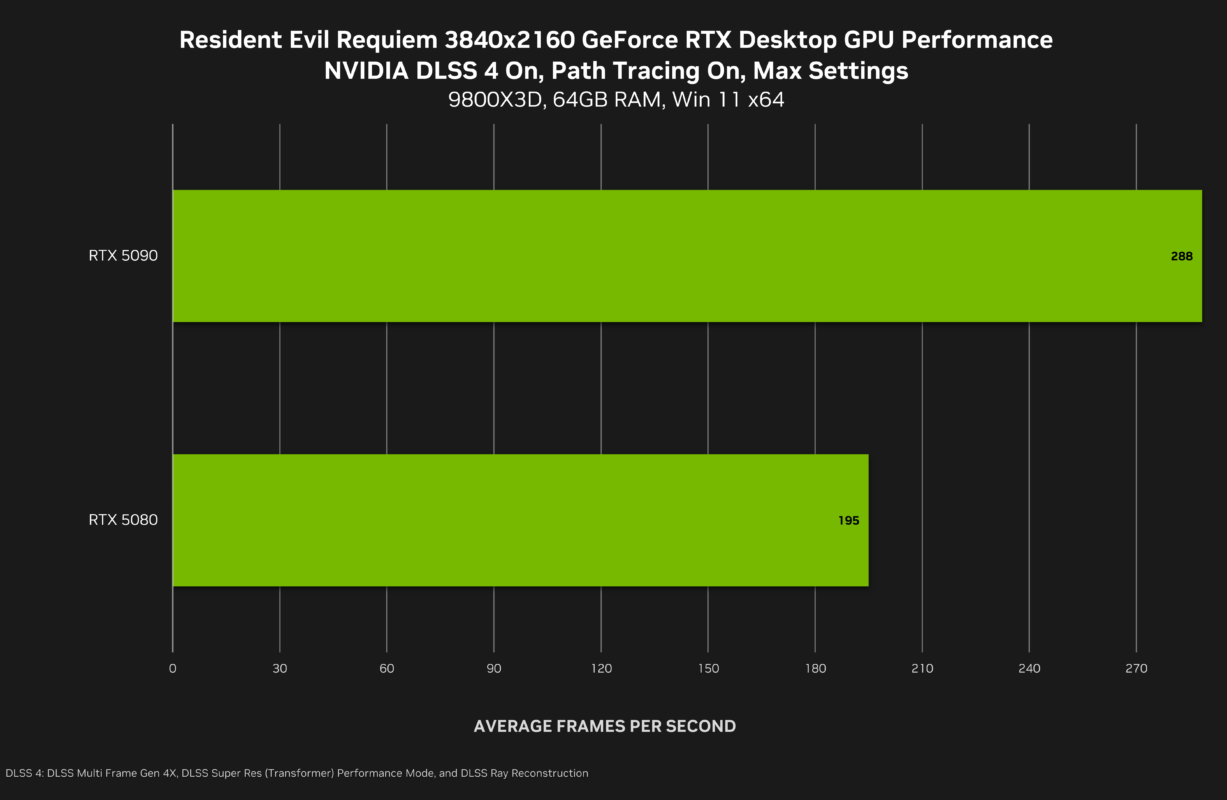
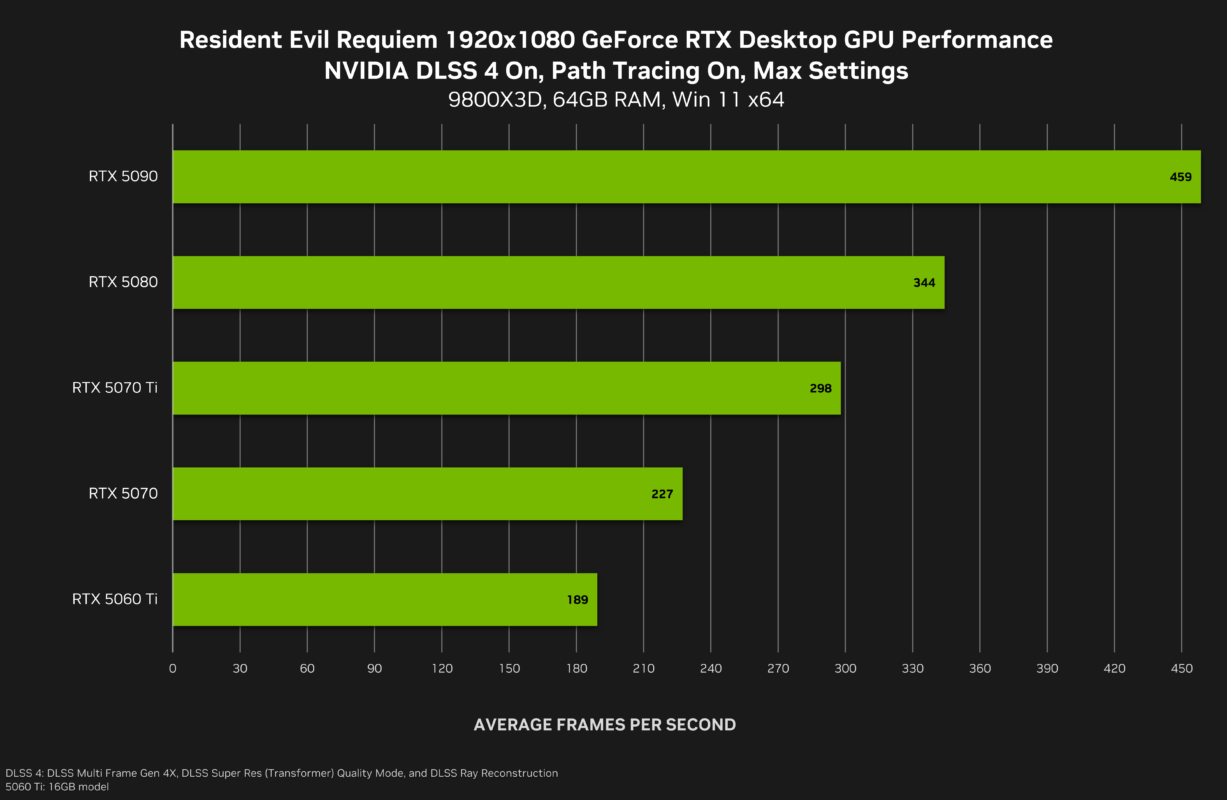
NVIDIA’s own demonstrations position Resident Evil Requiem as a flagship example of Path Tracing + DLSS 4 Multi Frame Generation on RTX 50 series GPUs. In showcase scenarios, the combination of:
- Path Tracing
- DLSS Ray Reconstruction
- DLSS Super Resolution
- DLSS 4 Multi Frame Generation
is presented as delivering dramatically higher frame rates compared to native rendering alone especially at 4K.
These figures represent ideal showcase conditions, typically using:
- Carefully selected scenes
- Optimised drivers
- DLSS and Multi Frame Generation enabled
- High-end RTX 50 hardware
They demonstrate what the technology is capable of when fully leveraged.
Independent benchmark snapshot
Independent testing paints a more grounded picture of baseline performance.
- At 4K, max settings, Path Tracing + DLAA, even an RTX 5090 can drop into the 24–27 FPS range.
- Switching from High Ray Tracing to full Path Tracing can result in a dramatic frame rate reduction in some cases cutting performance roughly in half at the top end.
- Standard ray tracing modes remain far more manageable and often provide the best balance between visuals and performance.
The consistent theme across independent testing:
Path Tracing is a massive performance hit, even for flagship GPUs.
Why vendor numbers and independent results can differ
It’s important to understand why headline FPS figures don’t always match real-world gameplay:
- Test scene differences – A controlled demo corridor may perform very differently from a combat-heavy open area.
- DLSS mode selection – Quality vs Balanced vs Performance has a major impact on base FPS.
- Multi Frame Generation scaling – Displayed FPS (with generated frames) is not the same as base rendered FPS.
- Resolution differences – 1440p vs 4K changes everything.
- Driver versions and build maturity – Early builds can behave differently from post-launch patches.
The key takeaway:
- Base FPS matters more than headline FPS.
- Multi Frame Generation multiplies what you already have it doesn’t eliminate a weak baseline.
- Path Tracing is best viewed as a showcase feature unless your GPU has serious headroom.
If you want a safe expectation:
- 4K + Path Tracing = High-end only, DLSS required
- 1440p + High RT = Much more realistic for smooth play
- No RT/PT = Still visually impressive and far easier to run
Common issues and fixes (especially with PT + DLSS)
Path Tracing plus DLSS delivers stunning lighting but it also introduces a few edge cases. Most problems aren’t “broken settings”; they’re side effects of heavy AI reconstruction layered on top of extremely complex lighting calculations.
Here’s what to watch for and how to fix it safely.
Ghosting / shimmer / weird artefacts
Independent testing has noted that in some scenes particularly with Path Tracing combined with Ray Reconstruction you may occasionally spot:
- Minor ghosting behind moving objects
- Shimmering in fine detail (foliage, wires, high-frequency textures)
- Momentary lighting instability in reflective surfaces
These issues are scene-dependent and tend to be more noticeable in motion rather than static comparisons.
Practical fixes (safe adjustments)
1. Use a less aggressive DLSS mode
If you’re running Ultra Performance, try switching to Balanced or Quality.
More aggressive upscaling modes can introduce visible softness and instability in fine detail. Moving up a tier often stabilises the image.
2. Lower the lighting workload (trade-off option)
If artefacts persist, consider switching from Path Tracing to High Ray Tracing instead.
You’ll retain improved reflections and shadow realism, but reduce the denoising and reconstruction pressure that can trigger visual quirks.
3. Avoid relying solely on generated FPS
If your base frame rate is very low, reconstruction artefacts can become more noticeable. Improving baseline performance (via resolution or DLSS tuning) often improves visual stability as well.
Stutter / frame-time spikes
In some testing of Resident Evil Requiem, brief frame-time spikes and minor stutter were observed in certain areas particularly when pushing higher lighting modes. This wasn’t described as constant or game-breaking, but it’s worth noting if you’re running Path Tracing or high-end ray tracing settings.
Path Tracing in Resident Evil Requiem dramatically increases GPU workload, and sudden lighting changes, complex reflections, or dense scenes can expose small frame-time inconsistencies even when average FPS looks strong.
Practical stability tips
1. Update your GPU drivers
New releases often include performance optimisations and stability improvements specifically tuned for major titles like Resident Evil Requiem.
2. Let shaders compile fully
The first time you load into areas, the game may compile shaders in the background. Avoid rapid restarts or immediate benchmarking runs — give it a few minutes to stabilise.
3. Lower Path Tracing before lowering resolution
If you’re experiencing spikes, try switching from Path Tracing to High Ray Tracing in Resident Evil Requiem first. This often reduces lighting-related frame-time variance while preserving visual quality.
4. Keep base FPS healthy
If your baseline frame rate is hovering in the low 30s, any spike becomes more noticeable. Adjust DLSS mode or resolution to maintain a more stable performance floor.
In short: minor spikes can occur when pushing Resident Evil Requiem’s most demanding lighting features, but sensible tuning and updated drivers typically smooth things out without sacrificing too much visual impact.
Is it worth enabling path tracing in Resident Evil Requiem?
Yes if you have the headroom and you’re chasing maximum mood. In Resident Evil Requiem, path tracing is one of those upgrades you immediately feel in horror spaces: deeper shadow detail, more believable bounce lighting, and reflections that make interiors look uncannily real. NVIDIA positions Requiem’s PC release as a showcase for path-traced effects paired with DLSS (including Ray Reconstruction and DLSS 4 Multi Frame Generation on supported GPUs).
No if you prioritise consistent FPS (or hate tuning). Independent testing consistently frames path tracing in Resident Evil Requiem as a major performance hit, even at the high end. PC Gamer calls it an “obvious frame rate killer,” and DSOGaming’s benchmarks show extreme drops at 4K with max settings when path tracing is enabled (to the point where you’re effectively pushed toward DLSS + frame-gen solutions).
The practical take: enable path tracing in Resident Evil Requiem when you can keep a solid base frame rate with DLSS (so the game still feels responsive), and use standard ray tracing (or no RT) when you want the smoothest, most consistent experience.
Path tracing is an advanced lighting technique that simulates both direct light and indirect light bouncing realistically around a scene including shadows, reflections, and global illumination. In Resident Evil Requiem this means lighting behaves more like it would in real life, boosting atmosphere and depth, especially in dark corridors and reflective environments. It’s a big visual upgrade over traditional lighting methods.
In practice for Resident Evil Requiem, ray tracing gives better lighting than no RT, but path tracing delivers noticeably richer and more realistic illumination at a far higher performance cost.
Yes. With Resident Evil Requiem’s path tracing, DLSS technologies (Super Resolution + Ray Reconstruction + Frame Generation / Multi Frame Generation) are essentially necessary for playability at higher resolutions. Without DLSS upscaling, even the best GPUs fall well below smooth frame rates with path tracing on.
Yes. The PC version includes DLSS 4 with Multi Frame Generation support letting capable GPUs generate additional interpolated frames to boost smoothness, especially at high resolutions and with path tracing enabled.
Path tracing in Resident Evil Requiem is extremely demanding. Current benchmarks show that even very high-end cards can struggle to reach smooth native performance without upscaling and frame generation. Cards with strong DLSS support and high raw performance (e.g., high-tier RTX 50-series models) benefit most, while lower-end cards are better served by ray tracing or standard rendering modes.
Yes DLSS Ray Reconstruction works with path tracing to clean up noise and improve lighting detail by using AI to denoise and reconstruct ray-traced frames. However, independent testing notes that in Resident Evil Requiem you can see some ghosting or visual artefacts (especially around complex materials like rain or smoke), so there’s a minor trade-off between noise reduction and occasional image oddities.
The standard edition of Resident Evil Requiem is listed on Steam at £69.99. UK retailers and comparison sites show offers from around £58.99+ depending on seller and deals.
