What is the Gigabyte GeForce RTX 3060 and who should consider it?
What type of product is the Gigabyte GeForce RTX 3060?
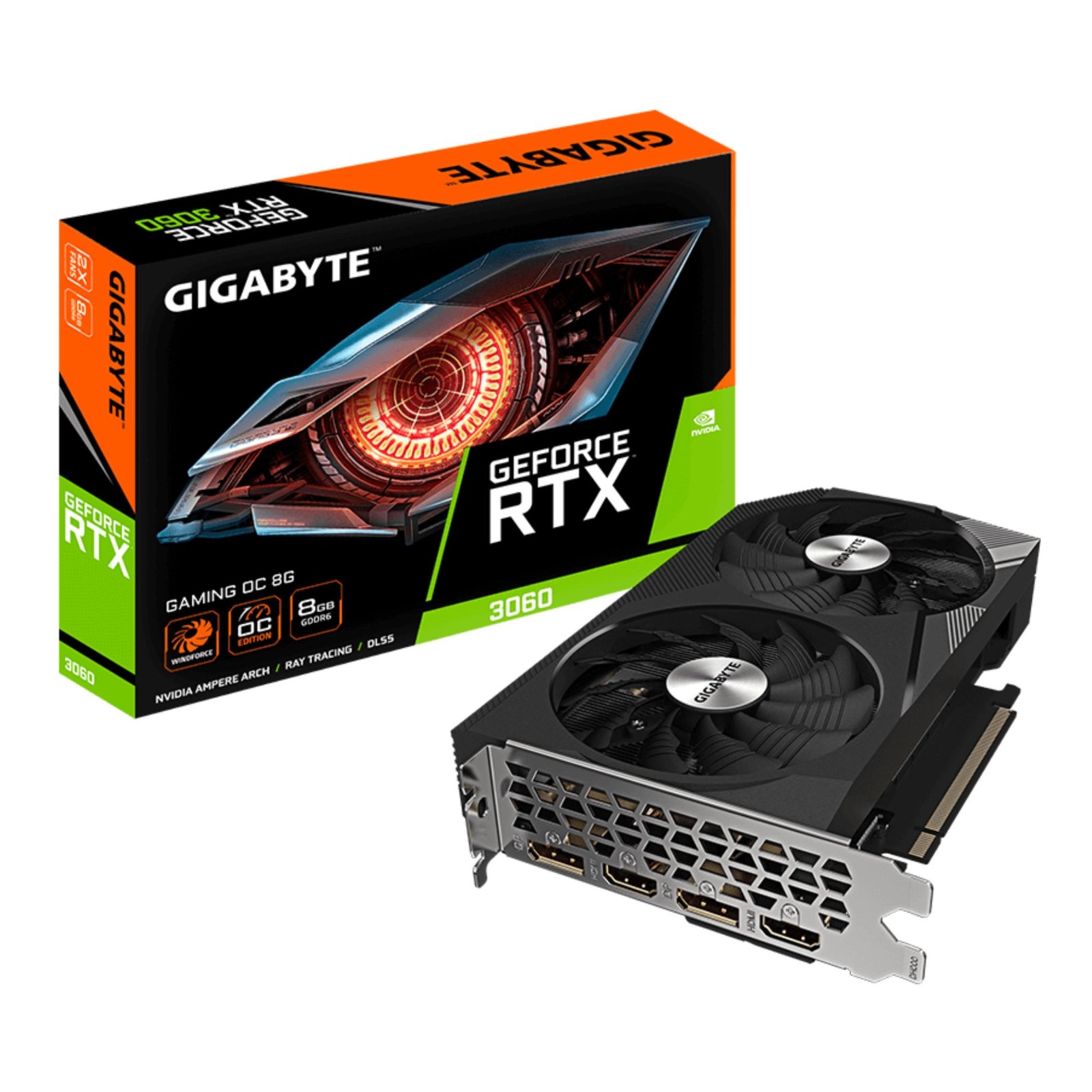
The Gigabyte GeForce RTX 3060 is an external desktop graphics card designed to enhance a computer’s graphical processing capabilities. It fits into a PCI Express x16 slot on a compatible motherboard, serving as a dedicated GPU (graphics processing unit). This card belongs to Nvidia’s GeForce RTX 30 series, utilising the Ampere architecture that brings improvements in performance and efficiency compared to previous generations. The "OC" in its model name indicates it is a factory overclocked version, meaning it runs at higher clock speeds than the base model. It is manufactured to fit standard PC cases, typically mid-tower or full-tower desktop systems.
Who is the Gigabyte GeForce RTX 3060 best suited for?
This graphics card is suited for a broad range of users who need a mid-range GPU. Gamers looking to play modern titles at 1080p and 1440p resolutions with high graphical settings will find it a capable option. Creative professionals and content creators who use software requiring GPU acceleration—such as video editing, 3D modelling, and graphic design—can benefit from its performance. Additionally, PC enthusiasts upgrading from older or integrated graphics solutions will appreciate the performance boost. However, it is not geared specifically towards high-end workstation tasks or extreme gaming demands, so professionals requiring top-tier GPUs may need to explore other options.
When should the Gigabyte GeForce RTX 3060 be used and what problem does it solve?
The Gigabyte GeForce RTX 3060 should be installed when the current graphics solution in a desktop system cannot meet the user’s performance requirements. Integrated graphics or older GPUs often struggle with recent games, causing low frame rates and poor visual quality. Creative workflows can be bottlenecked by slow rendering and encoding times without dedicated GPU resources. By upgrading to this card, users solve these issues, gaining the ability to run demanding applications more smoothly. The card also supports Nvidia’s RTX features, including real-time ray tracing and DLSS (Deep Learning Super Sampling), which enhance visual fidelity and performance in supported games and software. Thus, it addresses problems related to inadequate graphical power, slow processing, and lack of support for modern visual technologies.
What are the build, materials, and technical details of the Gigabyte GeForce RTX 3060?
What is the build and design of the Gigabyte GeForce RTX 3060 like?
The Gigabyte GeForce RTX 3060 is constructed as a standard external graphics card for desktop PCs. It generally occupies two expansion slots and fits into PCI Express x16 motherboard slots. The card includes a printed circuit board (PCB) that holds the GPU chip, memory modules, power delivery components, and other integrated circuits. Cooling is managed via a combination of fans and a heatsink assembly, designed to keep operating temperatures within safe limits during intensive workloads. The exact number of fans is not specified but typically involves two or three fans for effective heat dissipation. The card’s shroud and backplate are likely made of metal or reinforced plastic for structural support and durability. The “OC” version indicates factory-tuned higher clock speeds than base models, offering improved performance without requiring users to manually overclock.
What are the known dimensions and compatibility features?
Specific dimensions are not provided, but the card will usually measure around 230-280mm in length and about 40-55mm in height. It is designed to fit in most mid-tower and full-tower cases but might be too large for compact or small form factor builds. Compatibility requires a motherboard with an available PCI Express x16 slot. Power supply compatibility is also crucial; the card demands sufficient wattage and appropriate PCIe power connectors, commonly an 8-pin or 6-pin cable, though exact requirements are not stated. Users must ensure their power supply can deliver stable power during peak loads. The card supports current Windows operating systems and likely supports popular Linux distributions, though official compatibility should be verified. Video output options are expected to include HDMI and DisplayPort connectors, enabling connection to one or more monitors.
What technical specifications are available for the Gigabyte GeForce RTX 3060?
While detailed technical specifications are not fully listed, several core attributes can be inferred. The card features 8GB of GDDR6 memory, which is standard for mid-range GPUs and offers sufficient bandwidth for handling high-resolution textures and complex graphical computations. The GPU core is factory overclocked for higher clock speeds, improving performance out of the box compared to standard RTX 3060 models. It supports Nvidia’s RTX technology, which includes hardware-accelerated ray tracing and AI-based DLSS. These technologies enable more realistic lighting, reflections, and shadows in games and supported applications, alongside performance optimisations that help maintain smooth frame rates. Exact clock speeds, memory bandwidth, and power consumption figures are not specified and should be confirmed through official product documentation.
What are the key features, benefits, and limitations of the Gigabyte GeForce RTX 3060?
What are the major features of the Gigabyte GeForce RTX 3060?
- Feature: Factory overclocked GPU core
- Why it matters: This feature means the graphics processing unit runs at higher clock speeds than the base RTX 3060 model, resulting in increased performance without requiring users to manually adjust settings. This can translate into smoother frame rates in games and faster processing in creative applications from the moment of installation.
- Best for: Users who want enhanced performance immediately without technical knowledge or time investment in overclocking.
- Feature: 8GB GDDR6 memory
- Why it matters: The 8GB of fast graphics memory allows the card to efficiently manage large textures, complex models, and high-resolution video content. This ensures smoother gameplay, quicker rendering, and support for multi-tasking in GPU-intensive workflows.
- Best for: Gamers playing at 1080p or 1440p, creators working with high-definition video editing, 3D modelling, and graphic design projects of moderate complexity.
- Feature: Nvidia RTX technology support
- Why it matters: Hardware support for ray tracing brings realistic lighting and reflections to supported games, enhancing immersion. DLSS uses AI to upscale lower resolution images, improving performance with minimal visual quality loss. These features extend the card’s usefulness beyond traditional rasterisation techniques.
- Best for: Gamers and developers who want cutting-edge graphical effects and want to future-proof their systems for upcoming software.
- Feature: Efficient cooling system
- Why it matters: The cooling solution, likely consisting of multiple fans and heatsinks, maintains optimal operating temperatures. This prevents thermal throttling, ensuring consistent performance, and prolongs hardware lifespan by reducing wear from excessive heat.
- Best for: Users running demanding workloads, extended gaming sessions, or creative applications that push GPU usage.
What are the realistic benefits of using this card?
The Gigabyte GeForce RTX 3060 offers a strong balance between cost and performance for the mainstream segment. Users will experience substantially higher frame rates in modern games compared to integrated graphics or older dedicated cards. This results in smoother gameplay with higher settings, including the ability to enable ray tracing on compatible titles at acceptable frame rates. Content creators gain from accelerated rendering and encoding, which reduces time spent waiting for outputs in video editing or 3D projects. The card’s support for modern graphical APIs ensures compatibility with current and future software. Factory overclocking delivers performance gains without exposing the user to the risks or complexity of manual tuning. Overall, the card enables a more immersive and productive computing experience for everyday and enthusiast users alike.
What practical use cases are best suited for the Gigabyte GeForce RTX 3060?
Gaming at 1080p and 1440p is the primary use case, where the card can run most recent games on high or ultra settings with ray tracing enabled for enhanced visuals. It is well-suited for esports titles, AAA games, and VR experiences that do not demand the highest-end GPUs. Video editing workflows involving 4K footage benefit from faster rendering and real-time playback support. 3D modelling and animation projects of moderate complexity are comfortably handled. The card supports streaming gameplay or creative work to platforms such as Twitch or YouTube without significant performance loss. It is also useful for general productivity tasks where GPU acceleration can improve responsiveness in photo editing, virtualisation, and software development environments.
What practical limitations should be considered before purchasing?
Despite its strengths, the RTX 3060 is not a high-end GPU and has limitations. It may struggle to maintain high frame rates at 4K resolution, especially with ray tracing enabled. For professional-grade workloads such as multi-GPU rendering farms, scientific simulations, or 8K video editing, this card is not suitable. Its physical size and power requirements may not fit compact or low-wattage PC builds. The absence of detailed specifications requires buyers to verify compatibility with their system and software needs carefully. The performance ceiling is lower than higher-tier models like the RTX 3070 or RTX 3080, so users demanding the absolute best gaming or workstation experience should consider those alternatives. Lastly, cooling performance and noise levels, while generally adequate, will depend on the specific card design and case airflow.
Who is the Gigabyte GeForce RTX 3060 ideal for and what should buyers consider?
Who is the ideal customer for this graphics card?
The ideal customer is a PC gamer seeking to play modern titles with quality graphical settings without the expense of premium GPUs. It suits creative professionals, hobbyists, and semi-professionals requiring GPU acceleration for video editing, 3D modelling, and graphic design at intermediate levels. It is also appropriate for users upgrading older desktop systems that currently rely on integrated graphics or outdated cards. The Gigabyte GeForce RTX 3060 appeals to those wanting a reliable, factory-overclocked GPU with Nvidia RTX features at a mid-range price point. Buyers prioritising solid performance paired with modern visual effects support will find this card meets their needs.
Who might not find this graphics card suitable?
Users with professional-level requirements, such as intensive 3D rendering, complex simulations, or 8K video production, may find this card insufficient. Gamers targeting 4K ultra settings or multi-monitor setups requiring very high frame rates should consider higher-end GPUs. Those with very compact PC cases or limited power supply capacity must verify system compatibility, as the card’s size and power draw could pose installation challenges. Buyers seeking extensive factory customisation options, such as water cooling or extreme overclocking features, may look to specialist or higher-tier models. Additionally, users requiring official Linux driver support or compatibility with less common operating systems should verify before purchase.
What should buyers check before purchasing the Gigabyte GeForce RTX 3060?
Before purchase, buyers must check that their motherboard has an available PCI Express x16 slot free for the card. They should measure the internal space of their PC case to ensure the card’s length and width will fit without obstructing other components. The power supply unit needs to have adequate wattage and the correct PCIe power connectors, typically an 8-pin or 6-pin cable, to support the card reliably. Compatibility with the user’s operating system and intended software environment should be confirmed, especially for Linux users. Comparing prices and features against alternative cards within the RTX 30 series or competitor GPUs can help ensure the best value for the user’s specific needs. Buyers should also review return policies and warranty coverage where available.
What care, warranty, shipping, and returns details apply?
Specific warranty, shipping, and returns information for this card are not provided here. Typically, graphics cards from established suppliers include a manufacturer’s warranty lasting two to three years, covering defects in materials and workmanship. Buyers should consult the retailer or manufacturer for precise warranty terms and conditions. Proper care involves maintaining clean airflow inside the PC case to prevent overheating, which can degrade performance and hardware lifespan. Dust should be regularly removed from fans and heatsinks. Physical connectors and components should be handled carefully during installation and maintenance. Keeping graphics drivers up to date through Nvidia’s official channels ensures ongoing performance improvements and security updates. Shipping and returns policies vary by seller, and buyers should verify these details prior to purchase to understand their options if the product is incompatible or faulty.




Reviews
There are no reviews yet.